// 实战 · 一句话点一杯咖啡,从搜店到付款全程自主(内心的坐标在跑)
learn once · then run
同一段路 · 先后两遍
左边这遍走完,右边那遍才开始 —— 走的是同样五步。
第一遍 · 睁眼学截图 ×0
打开美团SHOT
(···,···)
顶栏 · 搜索框SHOT
(···,···)
第一家店卡SHOT
(···,···)
规格 · 大杯/热SHOT
(···,···)
收银台 · 付款SHOT
(···,···)
✓ 到达5 次截图 · 5 次判读
第二遍 · 成竹在胸截图 ×0
打开美团
(···,···)
顶栏 · 搜索框
(···,···)
第一家店卡
(···,···)
规格 · 大杯/热
(···,···)
收银台 · 付款
(···,···)
✓ 到达0 次截图 · 1 条命令
学的成本只付一次:那张图一旦成形,之后每一遍都只是照着它走下去。
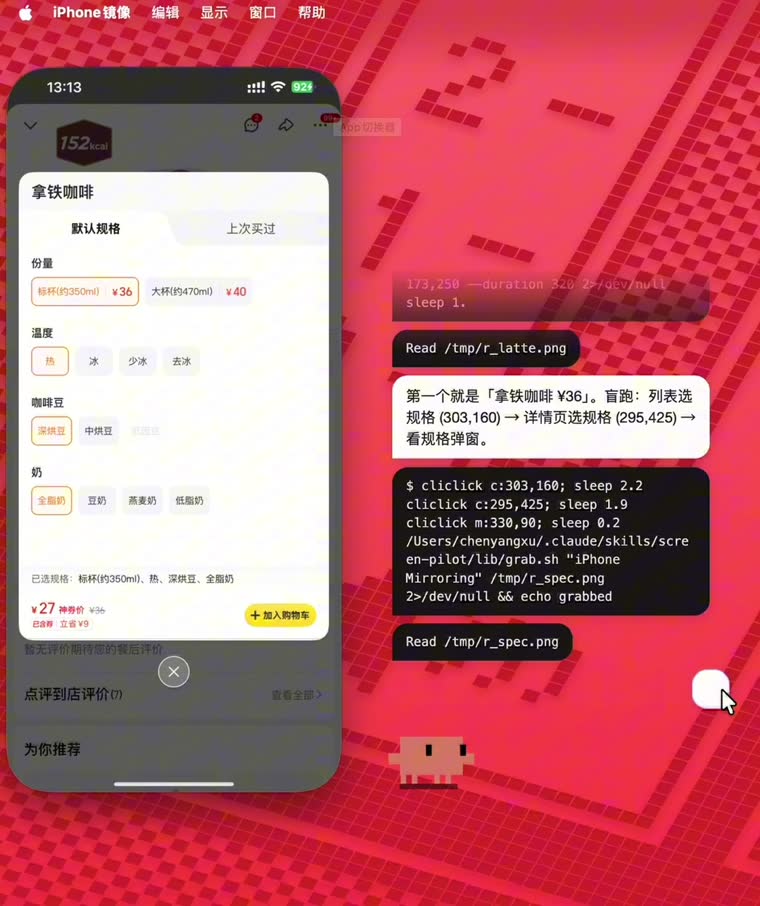
// 左:实拍,它把接下来三步的落点一次报完 右:这条链在它心里的样子——每个坐标都挂着一个动作
inner chain · one run
学过这条路之后,它把接下来每一步的落点一次报完,然后照着点
(173,658)
唤出 Spotlight,打开美团
(140,141)
点顶部搜索栏
(130,120)
输入 皮爷咖啡 → 搜索
(173,~175)DRIFT
点第一家店卡
Y 随促销 banner 浮动 → 从筛选行锚点重算
(295,425)
规格弹窗:大杯 · 热 · 深烘
(173,682)
确认并提交订单
(300,580)
收银台默认月付 → 切支付宝
(247,1017)
付款(这一步先截图,再问你一句)
// 挡在中间的三关,和三个决定
上图是它跑到一半的样子:右边那条白气泡里,它一口气把接下来三步要点哪儿说完了(列表选规格 → 详情页选规格 → 看规格弹窗,坐标都报了出来),然后就照着点,中间一张图没截。要让这件事成立,得先过三关。
第一关是风控,而它没法被"骗"过去。App 的反自动化是跑在它自己那台设备上的:在这台手机上找合成触摸、找附着的自动化框架、找越狱和调试器。你在手机上做手脚,它一定看得见。绕开的办法不是骗它,是换一台设备来做这件事——走 iPhone 镜像之后,agent 操作的其实是一个普通的 macOS 窗口,移光标、点击,这是苹果完全祝福的 Mac 自动化;镜像再通过苹果自己的接力通道把这一下转到手机上,到达时是一次来自设备真实输入栈的触摸,和你拇指按下去没有区别。手机那边什么异常都没发生。截图同理:iOS 的截屏保护管不到另一台机器的屏幕缓冲区。所以这不是谁家的漏洞,是两个各自合法的苹果功能之间的接缝里长出来的空隙。微信和美团都实测端到端跑通过。
第二关是模型自己。你跟它说"这段路你熟,别截图了直接跑",它嘴上答应,下一步还是想截一张看看——这个反射用提示词压不住。所以干脆把这个决定从它手里拿走:一条链路只要学过或被演示过,就默认标成 trusted。信任是先给的,出错才收回,而不是攒够次数才给。trusted 的链路直接跑脚本、零截图、只看退出码;哪次失败了自动降级回"睁眼"模式,修好跑通一次再自动升回去。
第三关是:光有一张坐标表还不够。坐标表把"怎么把这些点串起来"留给了模型,而模型一开始串,就又退回"点一下、截一张、再点一下"。所以一段学稳的路,最终产物是一条脚本——agent 跑一条命令走完整段,物理上就没有"中间"可截。哪天界面漂了,改脚本里那一个数,不用重学。坐标本身也能搬家:窗口每次都归一化到同一个位置、回读实际几何,再把学习时的坐标换算成窗口内的比例——换台 Mac、换个机型、换个人用,只算不重学。至于支付密码,永远不进脚本,从本机钥匙串现读现用、不落任何文件。
The still above catches it mid-run: in that white bubble it announces the next three taps in one breath — spec on the list, spec on the detail page, then read the spec modal — coordinates and all, then just does them, without a single screenshot in between. Three obstacles stand in the way. First, risk control — and it can't be fooled. An app's anti-automation runs on its own device, hunting for synthetic touches, attached automation frameworks, jailbreaks, debuggers. Anything you do on that phone, it sees. The way around isn't deception but doing the work on a different machine: through iPhone Mirroring the agent drives an ordinary macOS window — moving a cursor, clicking, fully sanctioned Mac automation — and Apple's own Continuity channel relays that tap to the phone, where it arrives as a genuine touch from the device's real input stack, indistinguishable from your thumb. Nothing unusual happened on the phone at all. Screenshots likewise: iOS capture protection can't reach another machine's screen buffer. So this is nobody's vulnerability — it's a gap that grows in the seam between two individually legitimate Apple features. Proven end-to-end on both WeChat and Meituan. Second, the model itself. Tell it "you know this route, skip the screenshots" and it agrees — then reaches for one anyway. That reflex cannot be suppressed by prompting. So the decision is taken away from it: any flow that has been learned or demonstrated is marked trusted by default. Trust is granted up front and revoked on failure, never earned by a counter. Trusted flows run the script with zero screenshots, judged only by exit code; a failure downgrades to eyes-open, and one clean run restores it. Third, a coordinate table isn't enough. A table leaves "how to string these taps together" to the model, and the moment it starts stringing, it falls back into tap-look-tap. So a stable route compiles into a script — one command runs the whole stretch, and there is physically no "between" left to capture. When the UI drifts, you change one number instead of relearning. The coordinates travel too: the window is normalized to the same position each time, its real geometry read back, and learned points converted into window-relative fractions — new Mac, new device model, new user, recompute rather than relearn. Payment passwords never enter a script; they're read live from the Keychain and never written to disk.
Repo
github.com/XiaoChu-1208/inner-coordinates
↗
// 对话栏 · 内容从底往上堆,顶部溢出的老对话被蒙版化掉(窗口尺寸全程不变)
// 左:一次完整会话(唤醒 → 应答 → 干活 → 打哈欠 → 睡下) 右:右键菜单
// ReAct 节奏 · 白气泡说人话,黑气泡记行动
// 桌面浮层的失败,都发生在你看不见的地方
有时候你会遇到这种事:点了一下但好像没反应、打完字回车却石沉大海、开口想让它停下它却还在念。浮层的问题大多是这一类——出错的时候,你不会收到任何提示。下面几条都是在处理这些。
① 打断要按代价分级。它正在念回复时你开口,直接掐掉就行,朗读被打断没有成本。但它正在干活(跑工具)时你开口,代价完全不同——那可能是一次真实的文件写入。所以干活时的判据门槛翻倍,而且发出去的是一个真正的 interrupt 控制请求,等同于你在 Claude Code 里按 ESC。单击它打断这件事放在了按下(pointerdown)而不是松手之后:不等松手、不受 600ms 连击窗口影响、也不被 7px 拖动阈值误判丢掉。急着让它闭嘴的时候,这零点几秒是有感的。
② 说话时不能靠喊唤醒词打断它。两个原因:它自己的朗读会盖住你的声音;而且它念到"claude"这个词的时候会自己触发自己。所以说话期间唤醒词直接忽略,改用主麦音量判断——你一开口它就停。
③ 打了字就不许悄悄消失。这条是修一个真实 bug 修出来的规矩:面板状态不对时,你打的字会被丢掉,而你完全不知道。现在发送接口会回一个 accepted,渲染端只在被接受时才清空输入框,否则文字和图片都留着、气泡抖一下告诉你没发出去。引擎那边还会自愈——面板标记为"隐藏"却收到了打字,说明它其实是可见的(否则你打不了字),于是修正标记继续处理。
④ 用空间提前量补偿延迟。浮层默认是鼠标穿透的(不然会挡住后面的 App),移上去才切成可交互。但"检测到悬停 → 通知主进程 → 生效"有一个来回,你去点那个 30px 的暂停键时,点击经常就从这个缝里漏过去了,时灵时不灵。解法是把输入行的判定区外扩 16px,让它提前进入捕获态。
⑤ 过滤语音识别的幻听。安静的时候,语音识别会凭空吐出"thank you for watching""谢谢观看"这类字幕残留——因为它的训练数据里全是视频。于是维护了一张幻听词表,再叠一个判据:这段音频里真正过了音量门的字节数。关门声触发了两秒采集、里面大半是静音,这种就会被挡掉,不会凭空冒出一个假气泡。
A click that didn't register, text you typed that never arrived, speech that failed to stop it — most overlay failures look like this: when something goes wrong, you get no signal at all. These five all address that. (1) Interruption is tiered by cost. Speaking over its speech just kills the audio — free. Speaking over its work is a different matter; that could be a real file write. So the threshold doubles during work, and what gets sent is a genuine interrupt control request — the equivalent of pressing ESC in Claude Code. Click-to-interrupt fires on pointerdown, not on release: no waiting for mouse-up, immune to the 600ms multi-click window and the 7px drag threshold. When you urgently need it to stop, those few hundred milliseconds are felt. (2) The wake word can't be used to interrupt speech — its own audio masks your voice, and it self-triggers when it reads the word "claude" aloud. So during speech the wake word is ignored in favour of raw mic level: you start talking, it stops. (3) Typed text is never silently dropped. This rule came out of a real bug: with the panel in a stale state, your text vanished and you never knew. Now the send endpoint returns accepted; the renderer clears the field only when accepted, otherwise it keeps text and images and nudges the bubble to tell you it didn't go. The engine self-heals too — a panel flagged "hidden" that receives typing must actually be visible, so it corrects the flag and proceeds. (4) Spatial lead time compensates latency. The overlay is click-through by default so it won't block apps behind it, becoming interactive only on hover. But "detect hover → notify main → take effect" is a round trip, and clicks on a 30px pause button slip through that gap. The fix: expand the input row's hit area by 16px so capture engages early. (5) Filter STT hallucinations. In silence, speech recognition emits caption residue like "thank you for watching" — its training data is full of video. So a phrase blacklist is combined with a second test: how many bytes in this clip actually passed the volume gate. A door slam that triggered two seconds of mostly-silent capture gets rejected, and no phantom bubble appears.
// 桌宠形象、SVG 动画素材与 mini 模式来自开源项目 Clawd on Desk;对话栏、气泡系统、语音与打断链路、ReAct 编排为本人实现。
Pet character, SVG animation assets and mini mode come from the open-source Clawd on Desk. The chat stack, bubble system, voice and barge-in pipeline, and ReAct orchestration are my own.
Repo
github.com/XiaoChu-1208/claude-baby
↗